
Free kit · Build it once. Own it forever.
Paste one prompt.Your AI builds your business websiteand puts it online.
The free Business Launch Kit has your AI set up your computer, design a site for your kind of business, build it, check it and launch it, on a DashNex app you own. You make the choices. You never type a command.
Free. First name and email. The kit arrives on the next screen and in your inbox.
- Tested by us on a blank laptop
- You never type a command
- A weekend, not a month
You are building my business website on DashNex, from start to finish, in one run.
I am not a developer. I may have nothing installed. Use plain words.
…186 more lines your AI follows
- Sets up your computerYou type: okChecks what is missing and asks before installing anything.
- Connects to DashNexYou click: AuthorizeOpens the sign-in window for you. Authorize, copy the code.
- Designs your siteYou type: goOne design direction for your business, pages and menus, shown to you as a plan.
- Builds and checks itYou look at the screenshotsEvery page, the legal pages and SEO basics, checked at phone and computer sizes.
- Puts it onlineYou type: deployNothing goes live until you say the word.
Live: northwindhomecleaning.dashnexcloud.com
Proof, not promises
We ran it ourselves, on a blank laptop.
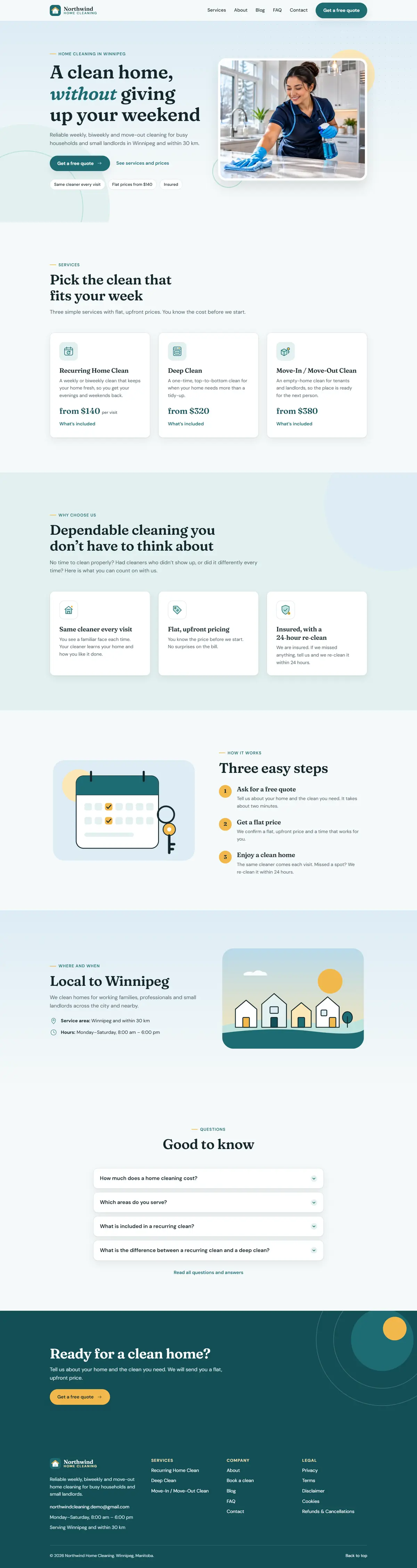
Before selling anything, we followed the free kit exactly as a buyer would: a Windows laptop with nothing installed, the zip, the guide and the one prompt. The result is Northwind Home Cleaning, a demo business. It is live right now.

- Started from
- A Windows laptop with nothing installed
- Commands typed
- None. The AI ran them
- Design
- Its own look, chosen for a cleaning business
- Status
- Live on the internet
Northwind Home Cleaning: a demo business built with the free kit. Live at northwindhomecleaning.dashnexcloud.com; captured Nov 13, 2026. No reviews or testimonials are shown on this page because we don’t have any yet.
What is in the zip
Real files. Open them before you build anything.
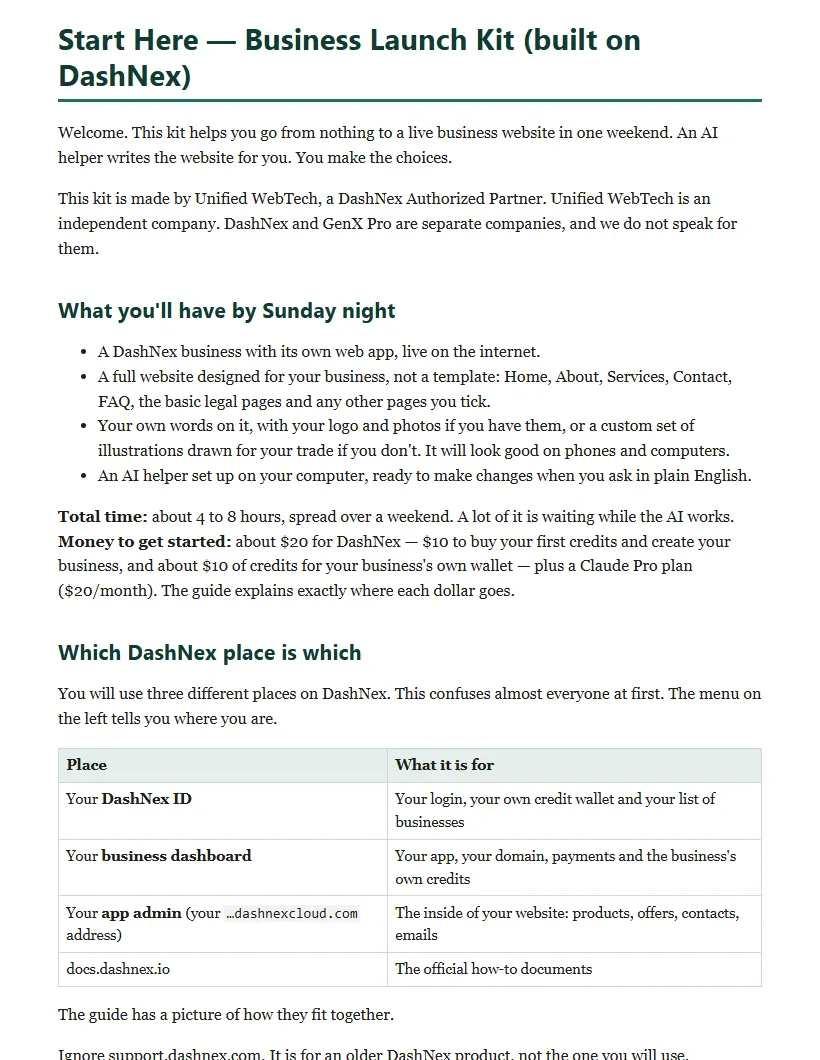
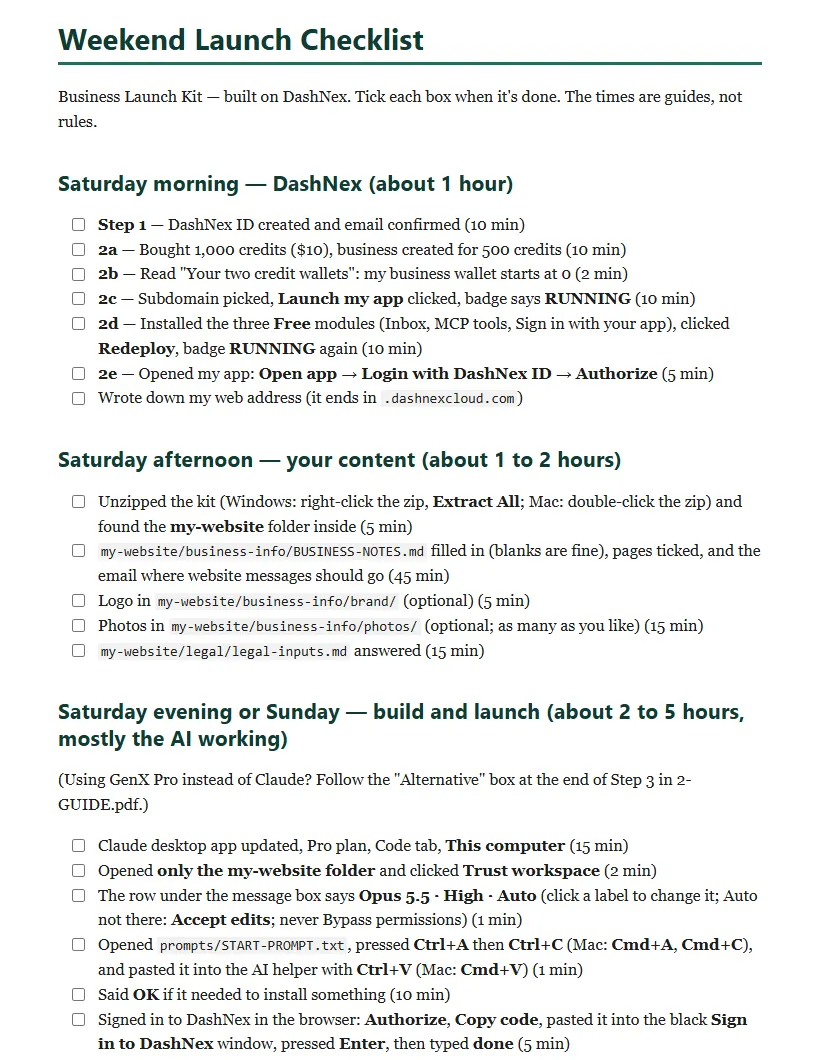
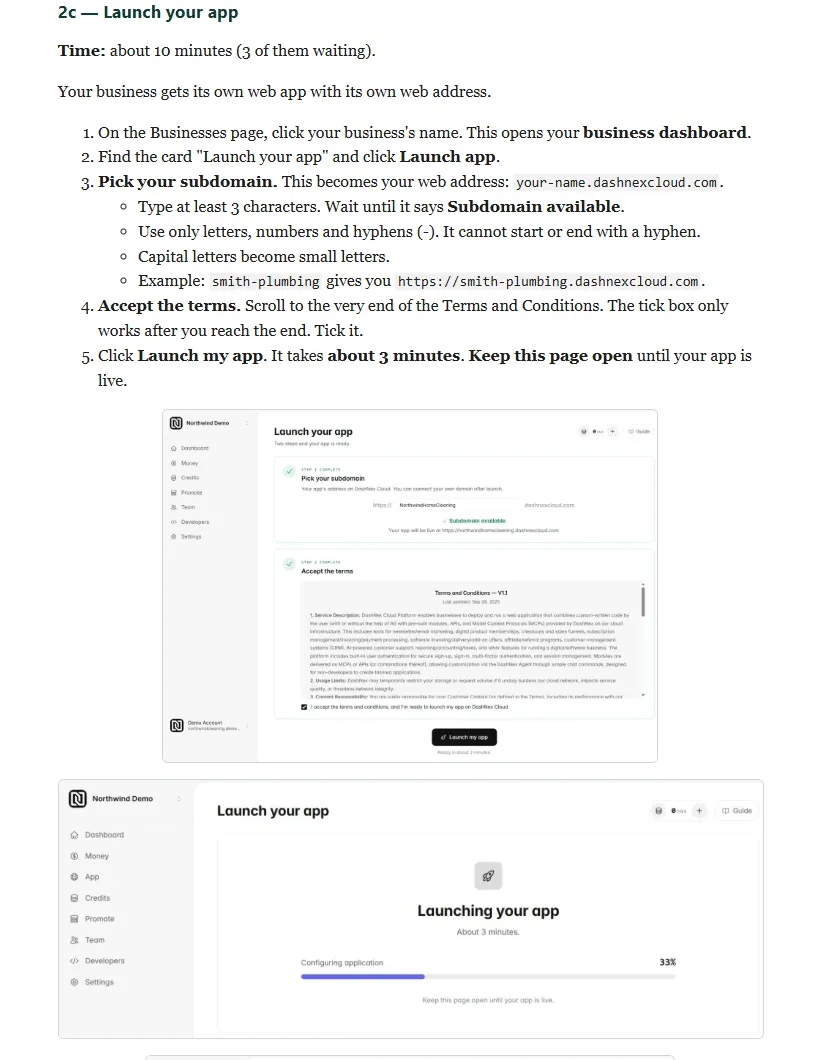
A one-page start, a guide with a screenshot for every click, a weekend checklist, the one prompt, and the project folder your AI works in, with rules that stop it inventing facts or going live before you say so.
Top level3
- 1-START-HERE.pdfOpen this first: what you will have, which DashNex place is which, and the 3 steps (double-click to open)
- 2-GUIDE.pdfOpen this second: the full click-by-click guide with screenshots
- 3-CHECKLIST.pdfThe weekend checklist, ready to print or tick off
more-files/50
- 01-GUIDE-Launch-on-DashNex.mdText version of 2-GUIDE.pdf (for copying from)
- 02-CHECKLIST-Weekend-Launch.mdText version of 3-CHECKLIST.pdf
- DISCLOSURE.mdDisclosures
- LICENSE.txtLicense: one business, no resale or redistribution
- START-HERE.mdText version of 1-START-HERE.pdf
- VERSION.txtVersion: Business Launch Kit — Free — v1.2 — 2026-11-13
images/
- app-tour.jpgScreenshot used in the guide (app-tour)
- claude-code-tab.jpgScreenshot used in the guide (claude-code-tab)
- claude-effort-high.jpgScreenshot used in the guide (claude-effort-high)
- claude-mode-auto.jpgScreenshot used in the guide (claude-mode-auto)
- contacts-test-message.jpgScreenshot used in the guide (contacts-test-message)
- dashnex-authorize.jpgScreenshot used in the guide (dashnex-authorize)
- dashnex-copy-code.jpgScreenshot used in the guide (dashnex-copy-code)
- dashnex-signin-page.jpgScreenshot used in the guide (dashnex-signin-page)
- deploy-permission.jpgScreenshot used in the guide (deploy-permission)
- deploy-safety-line.jpgScreenshot used in the guide (deploy-safety-line)
- dnx-app-home.jpgScreenshot used in the guide (dnx-app-home)
- dnx-app-launching.jpgScreenshot used in the guide (dnx-app-launching)
- dnx-app-live.jpgScreenshot used in the guide (dnx-app-live)
- dnx-app-settings.jpgScreenshot used in the guide (dnx-app-settings)
- dnx-auto-topup.jpgScreenshot used in the guide (dnx-auto-topup)
- dnx-broadcasts-domain.jpgScreenshot used in the guide (dnx-broadcasts-domain)
- dnx-business-credits.jpgScreenshot used in the guide (dnx-business-credits)
- dnx-business-dashboard.jpgScreenshot used in the guide (dnx-business-dashboard)
- dnx-confirm-code.jpgScreenshot used in the guide (dnx-confirm-code)
- dnx-create-agree.jpgScreenshot used in the guide (dnx-create-agree)
- dnx-create-business.jpgScreenshot used in the guide (dnx-create-business)
- dnx-domain.jpgScreenshot used in the guide (dnx-domain)
- dnx-modules-list.jpgScreenshot used in the guide (dnx-modules-list)
- dnx-money-agreement.jpgScreenshot used in the guide (dnx-money-agreement)
- dnx-mor-active.jpgScreenshot used in the guide (dnx-mor-active)
- dnx-mor.jpgScreenshot used in the guide (dnx-mor)
- dnx-open-app.jpgScreenshot used in the guide (dnx-open-app)
- dnx-payout.jpgScreenshot used in the guide (dnx-payout)
- dnx-quick-topup.jpgScreenshot used in the guide (dnx-quick-topup)
- dnx-redeploy.jpgScreenshot used in the guide (dnx-redeploy)
- dnx-register.jpgScreenshot used in the guide (dnx-register)
- dnx-subdomain.jpgScreenshot used in the guide (dnx-subdomain)
- dnx-topup-packages.jpgScreenshot used in the guide (dnx-topup-packages)
- dnx-transfer.jpgScreenshot used in the guide (dnx-transfer)
- dnx-two-wallets.jpgScreenshot used in the guide (dnx-two-wallets)
- final-report.jpgScreenshot used in the guide (final-report)
- finished-site-desktop.jpgScreenshot used in the guide (finished-site-desktop)
- finished-site-mobile.jpgScreenshot used in the guide (finished-site-mobile)
- p2-plan.jpgScreenshot used in the guide (p2-plan)
- signin-window-done.jpgScreenshot used in the guide (signin-window-done)
- trust-dialog.jpgScreenshot used in the guide (trust-dialog)
- windows-firewall.jpgScreenshot used in the guide (windows-firewall)
- windows-open-with.jpgScreenshot used in the guide (windows-open-with)
- zip-opened.jpgScreenshot used in the guide (zip-opened)
my-website/14
- .gitignoreKeeps DashNex login credentials, secrets and junk files out of version control
- CLAUDE.mdProject memory — Business website on DashNex
.claude/
- settings.jsonClaude Code permissions: allows the setup commands the kit runs, always asks before a deploy, blocks piped installers and reading your DashNex login file
.claude/rules/
- legal.mdLegal rules
- seo.mdSEO rules
.claude/skills/business-site/
- SKILL.mdSkill — Plans, designs, builds, checks and ships a complete small-business website inside the DashNex app in site/, from the owner's notes in business-info/ and legal/. Every site gets its own design, never a template look. Use for a full site build, any new page, menu, legal page, contact form, photos, brand files or SEO task.
.claude/skills/dashnex/
- SKILL.mdSkill — DashNex CLI recipes that are known to work (tools check, sign-in without a terminal, app download, local database, preview, check, first upload and the safe sync before later uploads), module names, and where the official DashNex developer docs are. Use for any DashNex command, sign-in, app pull, preview, deploy, logs, or a "/dashnex" request followed by a topic.
.claude/skills/dashnex/signin/
- open-full-link.cjs.txt'use strict';
- sign-in-mac.command.txt#!/bin/bash
- sign-in-windows.cmd.txt@echo off
business-info/
- BUSINESS-NOTES.mdBusiness Notes
business-info/brand/
- README.txtDrop logo (SVG/PNG), colour codes, font names here — optional.
business-info/photos/
- README.txtDrop your photos here (optional): your work, your place, your products, you.
legal/
- legal-inputs.mdLegal Inputs
prompts/5
- P1-environment-setup.mdP1 — Environment setup
- P2-one-pass-website-build.mdP2 — One-pass website build
- P3-small-changes.mdP3 — Thirteen small changes
- START-HERE-PROMPT.mdSTART HERE — the one prompt
- START-PROMPT.txtThe START prompt alone, ready to copy: open it, press Ctrl+A then Ctrl+C (Mac: Cmd+A, Cmd+C), and paste it into your AI helper
sample-from-pro/5
- E-01-welcome-sequence.mdE-01 — Write a 3-email welcome sequence — people can join your email list (through an Opt-in Form or your contact form), and you want them to get a…
- OC-01-first-product-offer-checkout.mdOC-01 — Set up your first product, offer and checkout — you want to sell one thing on your site (a service package, a digital product or a course) and take payment…
- page-map.mdPage map — Local service business
- Q-01-what-vibe-coding-cant-do.mdQ-01 — The "what vibe coding can't do" QA pass — before you share your site with customers, and after any big change. "Vibe coding" means building by chatting…
- README.txtThese four files are taken unchanged from Launch Kit Pro so you can see exactly what the paid kit looks like: one page map (local-service-business…
Real pages from the kit
How it works
Three steps. The last one is the AI’s.
Step 01
Create your DashNex ID
about 10 minutes
Your login and your own credit wallet. Free to create.
Step 02
Set up your business
about 45 minutes, some of it waiting
Buy your first credits, create the business, launch your app, add three free modules. Every click is in the guide.
Step 03
Paste the one prompt
about 2 to 5 hours, mostly the AI working
Fill in your business notes, paste START-PROMPT.txt, answer four things. Your site goes live when you type “deploy”.
Want to start Step 1 now? It takes about 10 minutes.
Unified WebTech is a DashNex Authorized Partner. We built this kit on DashNex because it is the platform we use for our own apps. When you create your free DashNex ID through our link, DashNex pays us a commission on credits you buy later. You pay nothing extra, and it is what lets us give you this kit free.
→ Create your free DashNex IDUsing the link is optional. The kit works the same if you sign up another way.
Honest costs
The kit is free. Going live isn’t, so here is every dollar.
What people usually pay for a small-business website, for comparison:
- Rent a website builder$17–$50a month, for as long as you have a site
- Hire a freelancer$1,500–$8,000up front, plus upkeep
- Hire an agency$6,000–$35,000+up front, plus a retainer
Source: Surmado, “How much does a small business website cost in 2026”, Aug 5, 2026. Typical ranges, not quotes.
What going live costs
Your launch, itemised
- Business Launch Kit$0.00
this kit
- DashNex: first credits$10.00
1,000 credits. Half creates your business (once)
- DashNex: business wallet$10.00
running costs and the fee on each sale
- Claude Pro plan$20.00/mo
your AI helper, by Anthropic. Monthly; cancel any time
DashNex credits never expire and are never refunded. Anthropic and DashNex set their own prices; check them before you buy. No website-builder rent.
Is it for you?
Built for owners, not developers.
It is for you if
- You run a small business, or you are about to start one.
- You need a real website: Home, About, Services, Contact, FAQ and legal pages, designed for your business.
- You do not code, and you do not plan to learn.
- You would rather spend a weekend than a month, or a few thousand dollars.
It is not for you if
- You need a complex custom web app.
- You already have a developer you are happy with.
Questions
Straight answers.
I am not technical at all. Will I really manage?
Yes, that is who it is for. You fill in a notes sheet in plain English, paste one prompt, and answer four things: OK to install a missing tool, your DashNex sign-in in the browser, “go” for the plan, and “deploy” to put it online. You never type a command. The guide has a fix-it table with the exact words to type if something goes wrong.
What does it really cost?
The kit is free. To go live you need about $20 at DashNex ($10 for your first credits, half of which creates your business, plus about $10 for your business wallet), and a Claude Pro plan for your AI helper ($20/month, by Anthropic). The guide shows where every dollar goes.
Will my site look like a template?
No. The kit makes the AI pick one design direction for your business and build the header, menus, page tops and sections around it. No photos? It draws a set of illustrations for your trade, so the site still looks finished. You can add photos any time with one of the included prompts.
Do I own the site?
Yes. The site’s code is in a folder on your computer, and it runs on your own DashNex app, under your own DashNex account. DashNex hosts it and charges running costs in credits; there is no monthly website-builder rent.
Do I need a Mac or a Windows PC?
Either. We tested the whole run on Windows. The Mac instructions are included but not yet tested end to end.
What do I get after signing up?
The kit on the next screen and by email (77 files: guide with screenshots, checklist, the one prompt and the project folder), then five short emails over about ten days, each about the next part of the launch. Unsubscribe any time.
What is Launch Kit Pro?
Optional. It adds a kit for your type of business (its build prompt replaces the general one), a sales page builder, 48 prompts for checkout, email, chat and blog, and legal templates. $79.97, one-time. You never need it to use the free kit.
Free · 77 files · v1.2
Your website, live, on a platform you own.
One prompt. Your AI does the typing. You make the choices.
Get the free Business Launch Kit
First name and email. The kit opens on the next screen and lands in your inbox.